


Create field mappings
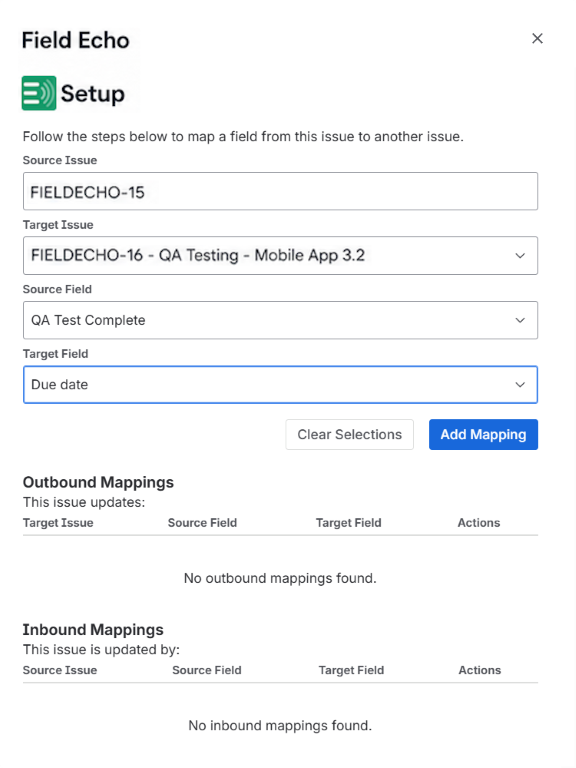
Connect compatible fields between related issues with the Field Echo panel.

Automatic field synchronization for Jira
A changed launch date, priority, or customer reference should not leave your team tracking down every issue that contains it. Field Echo automatically synchronizes mapped fields across related Jira issues, keeping shared information current where teams plan, work, and report.
Choose which issue holds the source value and which fields should follow it. Field Echo handles subsequent updates across teams and projects, while everyone continues working in their own issues.
01 / The coordination problem
Engineering, testing, and customer success may all need the launch date on their own Jira issues. It belongs in their planning views, filters, and reports—not just in an epic someone has to open to check.
The problem starts when that date changes. Every copy becomes another update to remember, and one missed edit can leave a team working against the old plan.
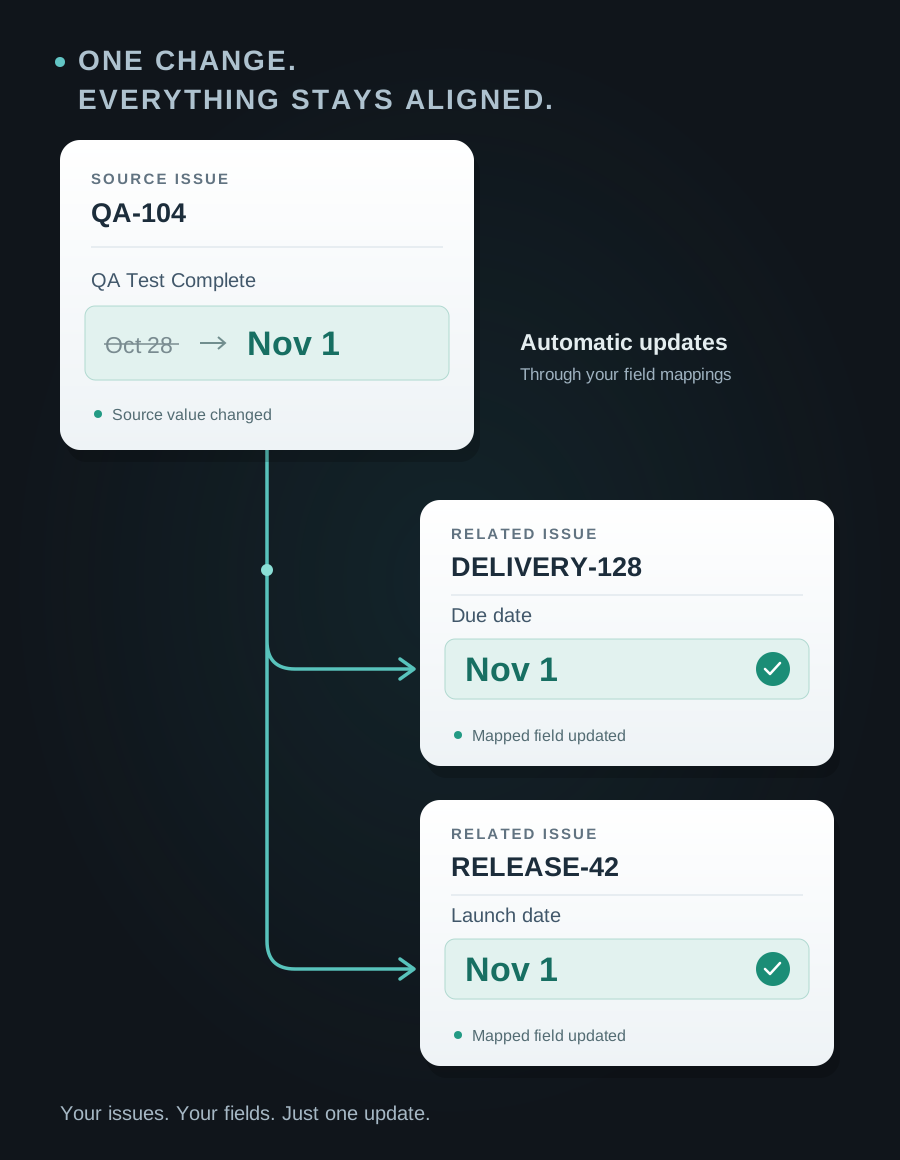
Field Echo keeps those fields connected to a source you choose. When the source changes, the mapped fields follow, so keeping information close to the work does not mean maintaining it by hand.
Use synchronization for fields that represent the same fact. A team’s independent deadline or a historical record of the original plan should remain separate.
Explore the practical guides in InsightsOne issue changes while a related team's field still shows the old plan.
Someone opens the same related issues and copies the same value again.
Filters and reports reflect inconsistent information across connected work.
02 / How changes travel
You decide which fields should stay synchronized and which should remain independent. A shared launch date can follow the program’s source issue while each team keeps its own delivery deadline.
Create a one-way mapping between compatible fields, within a project or across projects. Updates flow from source to target; target edits do not flow back, and circular mapping paths are blocked. No Jira Automation rules or workflow changes are required.
Read the complete Documentation03 / Field Echo in action
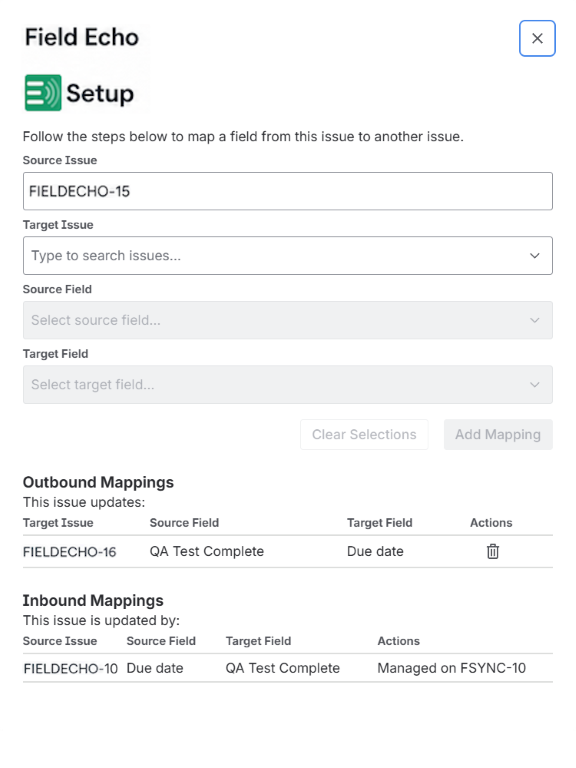
View incoming and outgoing mappings from your Jira issues, so you can understand which fields receive updates and which supply them. Manage a mapping from its source, or remove it when the relationship is no longer needed.
Connect compatible fields between related issues with the Field Echo panel.
View mappings from either issue. Modify or remove a mapping from its source.
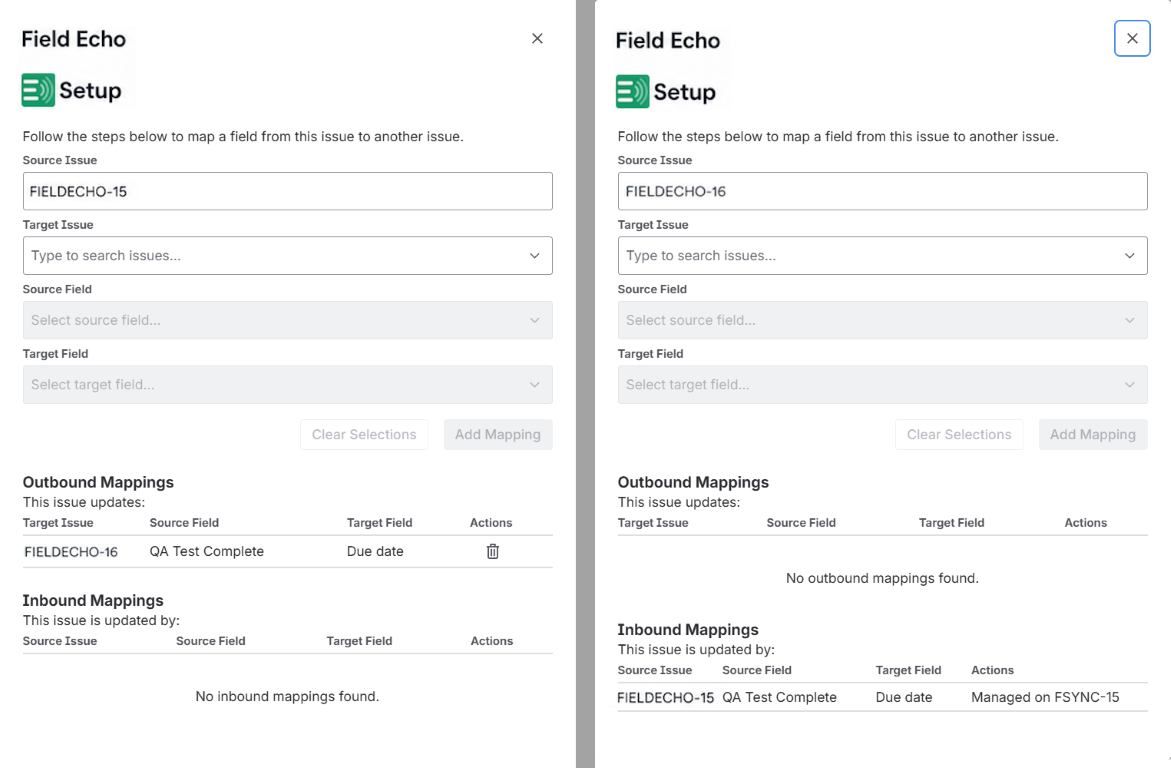
An issue can receive updates from one issue and synchronize mapped fields to others, with loop protection.
For administrators, the Admin Console brings active mappings, health indicators, and recent synchronization errors into one place. When an update fails, you have a place to investigate.
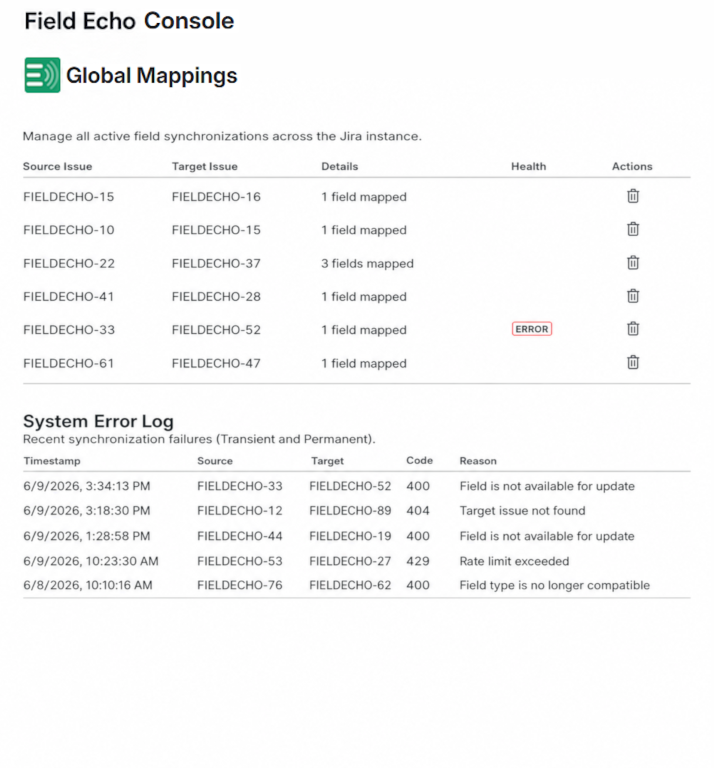
04 / Across teams and projects
Keep the fields that represent the same fact consistent, while teams retain their own work items and workflows.
Planning
Engineering, QA, and customer success each need the launch date in their own Jira issues. Map those fields to the release issue so a schedule change reaches each team’s planning views and reports without another round of manual updates.
Delivery
A program’s priorities can change while delivery work is spread across several Jira projects. Map the shared priority from the program’s source issue to the related delivery issues, so teams see the updated priority alongside the work they need to do.
Relationships
An internal delivery issue and a partner-facing issue may need the same milestone date or shared text. Synchronize the relevant fields so changes reach the partner-facing record without someone copying each update. Choose which fields to share within the issues users are permitted to access.
Visibility
Teams build filters and reports from different sets of issues. When those issues carry copies of the same customer reference, milestone, or reporting field, outdated values can produce conflicting views. Map those fields to a common source so reports use consistent information as it changes.
05 / Operational boundaries
Field Echo focuses on field-to-field synchronization. It does not modify workflows, permissions, issue security schemes, or project configurations.
06 / A practical first mapping
Choose two Jira issues that need the same date or other shared value. Decide which one owns that fact. Create a mapping, change the source field, then inspect the receiving issue and the mapping views on both sides.
Field Echo is available through the Atlassian Marketplace. For setup details, compatible fields, permissions, troubleshooting, and FAQs, use the Documentation.
Check that the mapping exists, the source changed after creation, and the target field remains editable.
Use recent error messages and mapping health to distinguish temporary failures from relationships needing attention.
Include issue keys, timestamps, and application errors. Open the support portal or email support@alterisedge.com.
Field Echo for Jira
Keep related work aligned through explicit, one-way field mappings.