


A launch date changes on a product epic, but one delivery team’s issue still shows the old date. Both values look plausible. Which one should people use?
Related Jira issues often need the same information close at hand: a launch date, customer name, priority, or contractual milestone. Copying it onto each team’s issues can make that information easier to use. It also creates more places to update when the original changes.
Keeping those copies reliable starts with deciding which issue owns the value and whether the others should continue to follow it.
Why shared information gets copied
There are good reasons to put the same value on more than one issue.
Imagine a primary epic that represents a customer-facing product launch. Three engineering teams each have their own Jira issues tied to that work. The launch date matters to all three teams, so it is useful for that date to appear directly on the issues they use every day.
The alternative would be to ask each team to navigate back to the primary epic whenever they need that information. That may preserve a single source of truth, but it can also make the day-to-day workflow cumbersome.
The same pattern appears with many kinds of information:
- target dates
- release versions
- customer or account names
- priority
- program or initiative identifiers
- deployment details
- regulatory or contractual milestones
In each case, the copied field is useful because it brings important context closer to the work.
The difficulty is that copying a value also creates another place where that value can become wrong.
Copies tend to drift
The first copy is easy.
Suppose the primary epic has a launch date of October 15. That date is copied to three related work items, and everything is consistent.
Two weeks later, the launch moves to November 1.
Someone updates the primary epic. Perhaps they remember to update two of the related issues as well. The third is missed.
Nothing looks obviously broken. Jira continues working exactly as expected. But the organization now has two different answers to a simple question: when are we launching?
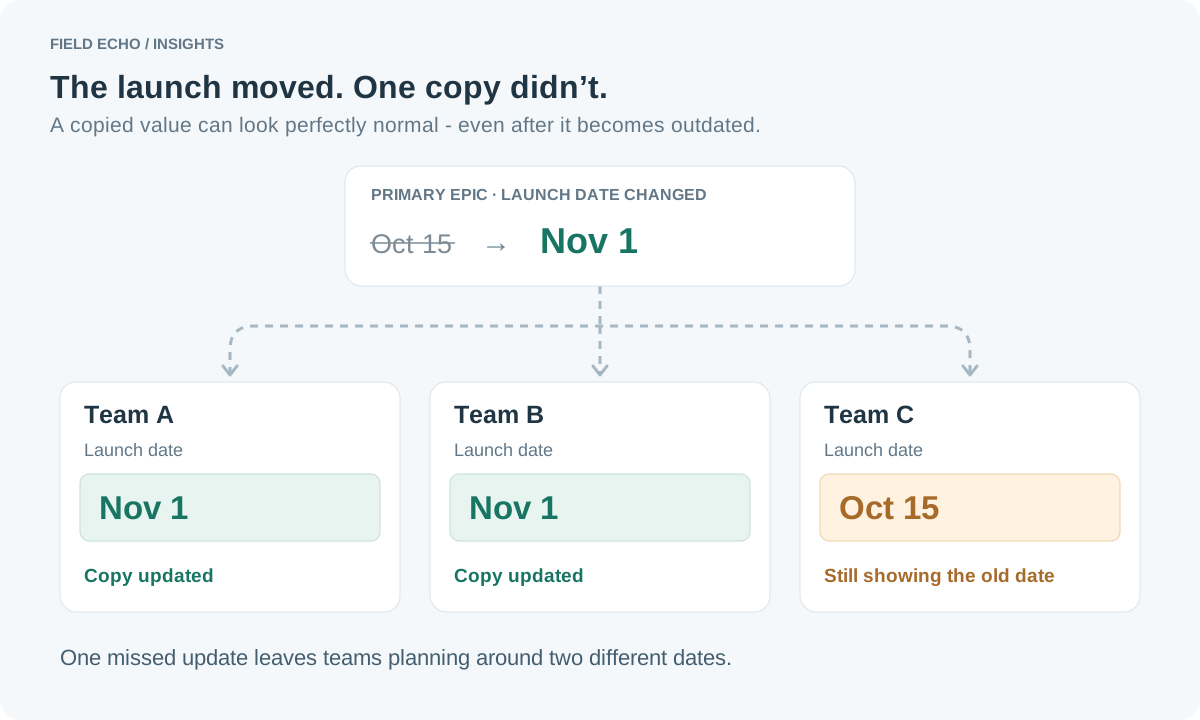
These inconsistencies are particularly difficult because they often remain invisible until someone acts on the wrong value.
A developer schedules work around the old date. A manager includes outdated information in a status report. A support team prepares for a release that has moved.
Keeping the dates consistent depends on someone finding and updating every copy whenever the plan changes. As more issues and teams become involved, it becomes easier to miss one.
Decide which issue owns the value
Before deciding how to automate anything, it helps to answer a simpler question:
Where does this value actually belong?
If several issues contain the same launch date, they do not necessarily have equal authority over it.
Perhaps the product epic owns the launch date, while the engineering issues simply need visibility into that date. If so, the relationship is clear: the epic contains the primary value, and the related issues contain copies.
Without it, synchronization can become ambiguous very quickly. If someone changes the date on a team issue, should that update the primary epic? What happens if two teams make different changes? Which one wins?
For many shared fields, there is a natural direction of authority.
A program issue might own the target date. A customer request might own the account name. A release issue might own the release identifier. Related delivery work items need those values, but they do not need to control them.
Thinking in terms of primary values and dependent copies is often enough to simplify the design.
Four common approaches
There is no single correct way to handle shared Jira data. The right approach depends on how often the value changes, how important consistency is, and how much complexity the process justifies.
Keep the value in one place
The simplest option is not to copy the field at all.
If users can reasonably refer back to the primary issue, keeping the value in one place eliminates the consistency problem entirely.
This works particularly well when the information changes frequently but is only occasionally needed by other teams.
It is worth considering this option first. Not every inconvenience needs automation, and avoiding unnecessary copies is the most reliable way to prevent those copies from drifting.
Copy the value once
Sometimes the information needs to be transferred when a related work item is created, but it does not need to remain connected afterward.
For example, a team issue might inherit the customer name or initial priority from a parent initiative. Once the issue enters the team's workflow, however, that value may legitimately evolve independently.
In that situation, a one-time copy is appropriate.
The important question is whether later changes to the original value should matter. If the answer is no, ongoing synchronization would add complexity without providing much benefit.
Update the value through automation
Jira automation can handle some cases where related fields need to be updated.
A rule might trigger when the launch date changes on the primary epic and then update a known set of related issues. For relatively straightforward relationships, this can work very well.
Automation is especially attractive when the update is part of a larger business rule. Perhaps a release date change should also notify a team, add a comment, transition a work item, or update several other fields.
In that case, field copying is only one part of a broader workflow, and automation is a natural place to handle it.
The tradeoff is that automation rules can become harder to understand as the relationships grow. Several rules may affect the same fields, conditions may accumulate over time, and troubleshooting can require figuring out which rule changed what and why.
That does not make automation the wrong choice. It simply means the complexity should remain proportional to the problem being solved.
Keep the value synchronized
The final option is to treat the copied value as a persistent reflection of another issue.
If the launch date on the primary epic changes, the corresponding field on each related issue changes as well. The dependent issues continue to show the value locally, but the primary issue remains authoritative.
This is particularly useful when three conditions are true:
- The value needs to appear on several issues.
- The value may change after those issues are created.
- Those copies should continue representing the same underlying data.
These copies need to follow later changes, so the connection must remain in place.
When one-way synchronization makes sense
It is tempting to think of synchronization as meaning that every issue can update every other issue. In practice, that is often unnecessary.
Consider the launch-date example again.
The product epic owns the launch date. Engineering, QA, documentation, and support issues all need to display it. Those teams should see the current date, but changing the field on a downstream issue should not silently redefine the product launch.
That makes the relationship naturally one-way:
Authoritative work item → related issues
One-way synchronization preserves both convenience and authority. Teams can see the information where they work, while there is still a clear answer to the question, “Which issue owns this value?”
The same pattern works well for customer information, release metadata, program identifiers, committed dates, or other values that are defined in one place but useful in many.
Field Echo supports this approach through persistent, one-way mappings between compatible fields on Jira issues. Saving a mapping does not copy the current value. Later changes to the source field update the mapped target field.
Choose the simplest model that preserves the truth
When the same Jira field appears on several related work items, the instinct is often to ask how to automate the updates.
A better first question is whether those fields are supposed to represent the same fact.
- If they are not, copying once may be enough.
- If there should only be one authoritative value, keeping it in one place may be better.
- If changes need to trigger broader workflow behavior, automation may be the natural choice.
- And if several issues need to continuously display the same value while one issue remains authoritative, persistent one-way synchronization is usually the cleanest model.
The technical implementation comes after that decision.
The goal is not to eliminate every duplicate value in Jira. Duplicate information can be useful. The goal is to make sure everyone understands which copies are independent, which are connected, and where the authoritative value lives.
Once that is clear, keeping related Jira issues consistent becomes a much more manageable problem.